cURL POST Requests
Example code for making POST requests with cURL in Streamer.bot
While the built-in Fetch URL sub-action is great for making quick HTTP GET requests, sometimes you may need to make more complex requests, such as POST requests with custom headers and body content.
This utility action provides a simple way to make HTTP requests using cURL, which supports a wide range of HTTP methods and options.
curl is now included by default on Windows 10 or later, so there is no need to install it separately.
This utility action will use the system
curl executable to make HTTP requests.Setup
Load the import code
- Copy the import code above
- Click Import at the top of Streamer.bot to open the Import Dialog
- Paste the import code into the Import String field in Streamer.bot
Confirm the Import
You should see the Name field populated with wsgs.utils.curl with a single action.
Click Import to add the wsgs.utils.curl action to your Streamer.bot instance.
Usage
To send an HTTP request using the cURL utility action, you can use the Set Argument sub-action to set the necessary arguments for the request, and then execute the wsgs.utils.curl action by utilizing the Run Action sub-action.
Input Arguments
GET if not specified.
Supported values:
GET, POST, PUT, DELETE, HEAD, PATCH, OPTIONSPOST or PUT.
If passing JSON data, ensure it is properly stringified and escaped. For example,
{"key":"value"} would need to be passed as {\"key\":\"value\"}Accept header to specify the expected response format.
For example,
application/json to indicate that you expect a JSON response.Authorization header to include credentials or tokens for authentication.
For example,
Bearer your_token_here for bearer token authentication.wsgs.utils.curl action to prevent sensitive data from being logged.Content-Type header to specify the format of the request body.
For example,
application/json if you are sending JSON data in the request body.User-Agent header to specify the client making the request.
For example,
MyStreamerBotClient/1.0 to identify your Streamer.bot instance in the request.Output Variables
After executing the wsgs.utils.curl action, you can access the following output variables to get information about the response:
Read more about
wsgs.utils.json.parseExample
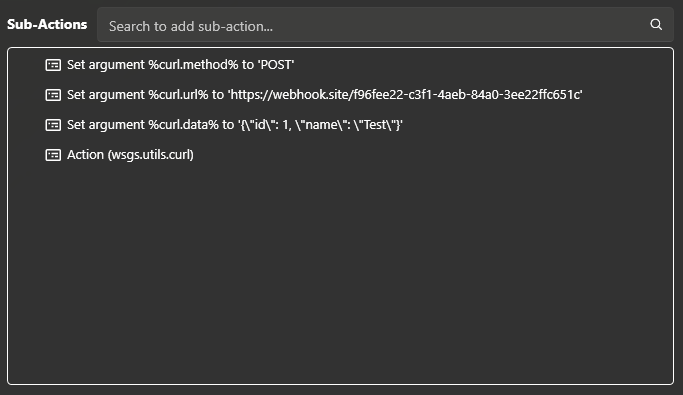
For example, to make a POST request with a JSON body, you could set your arguments as follows:
| Argument | Value |
|---|---|
curl.method | POST |
curl.url | https://webhook.site/f96fee22-c3f1-4aeb-84a0-3ee22ffc651c |
curl.data | {\"id\": 1, \"name\": \"Test\"} |
curl.headers.accept | application/json |
curl.headers.contentType | application/json |
Then simply run the wsgs.utils.curl action to send the request with the specified arguments: