Remote Triggers
Easily communicate between multiple Streamer.bot instances
Whipstickgostop
You can use Remote Triggers to easily send data or execute actions on multiple Streamer.bot instances. It even works over remote networks!
Prerequisites
- Multiple Streamer.bot Instances
- If you don't already have two Streamer.bot instances, this tutorial is likely of no use to you! 😊
- Remote triggers work great with two instances on the same PC, separate PCs, or even in completely separate locations.
- Enable Streamer.bot Website Integration
All instances must have the Streamer.bot Website Integration configured and enabled in order to communicate with each otherRead more about setting up the Streamer.bot Website Integration
Instructions
- Send a triggerNavigate to Actions in Streamer.bot Instance #1
- Create a new action
- Use an existing action if you know what you are doing!
- Add any trigger you want to execute this action
- We are going to use a Test trigger
- You can use anything you want, e.g. Commands, Chat Messages, etc.
- Add a Streamer.bot > Remote > Send Remote Trigger sub-action
- Select the destination instance
- Any instances connected to your Streamer.bot website account will show up here
- Enter an event name
- We are going to enter
"test"
- We are going to enter
- Add any arguments you would like to send to the other instance
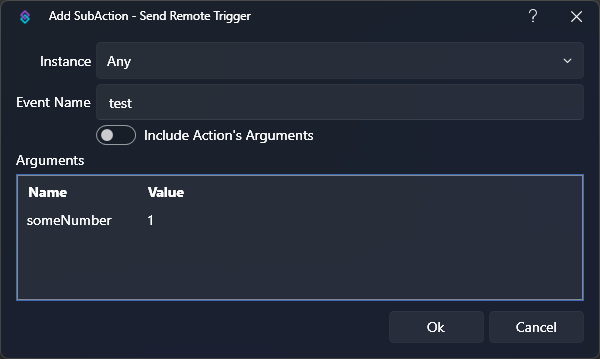 Send Remote Trigger Sub-Action
 - Create a new action
- Receive a triggerNavigate to Actions in Streamer.bot Instance #2
- Create a new action
- Use an existing action if you know what you are doing!
- Add a trigger: Integrations > Streamer.bot Remote > Remote Instance Trigger
- Select
Any, or select the specific instance which is sending the remote trigger - Set the event name to the same name you used on the sending side
- We used
"test"
- We used
- Add any sub-actions to perform when this action is triggered!
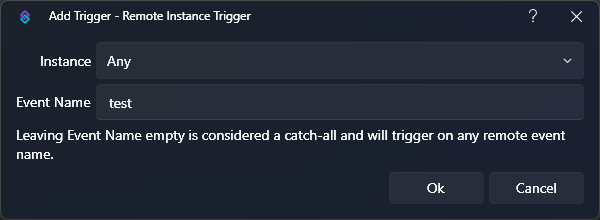 Remote Instance Trigger
 - Create a new action
- Done!
Since we used the Test trigger on our sending action, we can Right-Click the trigger on Instance #1, and clickTest. This will execute our action and then execute the action configured on Instance #2!You have successfully enabled communications across multiple Streamer.bot instances!
Tips & Tricks
- You can use the
Include Action's Argumentsoption to send all variables from a trigger on one instance, over to the second instance. - You can use the
Argumentstable entry to include any arbitrary data you wish to send to the second instance