Simple Counter
Create a simple counter to count up or down
tawmae
Counters can be used in various ways, for example:
- Death counters in video games
- Counting how many times the streamer has yawned
- Keep track of how many times a specific command has been used.
While commands and Twitch Channel Point Rewards offer their own built-in counters, they're not as versatile as the following example which utilizes global variables.
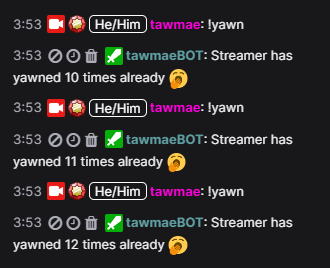
Counter Preview
Instructions
- Creating a new action
First off, we create a new action and assign the trigger that we want to use for the counter to go up. In this example, we'll create a yawn counter and want it to add+1to the counter when a!yawncommand has been used.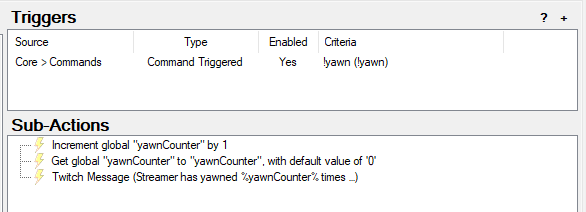 Counter Action
 - Creating the global variable
Now we create our actual global variable. This is done by the Global (Set) subaction that we can find underCore -> Globals -> Global (Set). We can give it any name we want and choose Increment in the dropdown menu, because we want to add a value. We can now type1in here to add 1 to the value each time we trigger the action. If we leave it empty, it will also default to 1.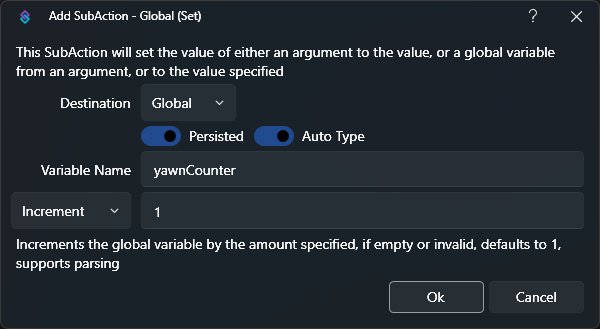 Counter Global Set Subaction
 - Bring the global variable into the action
Global variables work a little different than regular variables that we use in our actions, because they don't just disappear into the void once the action has finished. So by default they're not available within the action (even after creating it in that very same action), unless we call them. For that we create a Global (Get) subaction to bring our newly created global variable from above as a regular variable into our action.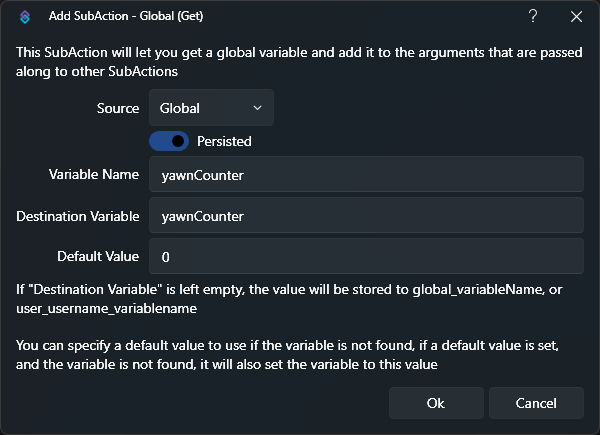 Counter Global Get Subaction
SoVariable Nameis the actual name of our global variable (the name in our Global (Set) subaction). In our case, it'syawnCounter.
TheDestination Variableis its new name that we can use as a variable in our action. It can have a different name likeyawnCounterVariable, but for sake of simplicity we can just give it the same name.
TheDefault Valueassigns a value if the variable doesn't exist at the time we are calling it. But since we created it before with our Global (Set) subaction, this is technically redundant. - Using our new variable
We're pretty much done! Now each time we use our!yawncommand, it will increment theyawnCounterglobal variable by+1and we can then for instance use that in a Twitch Message subaction:Streamer has yawned %yawnCounter% times already 🥱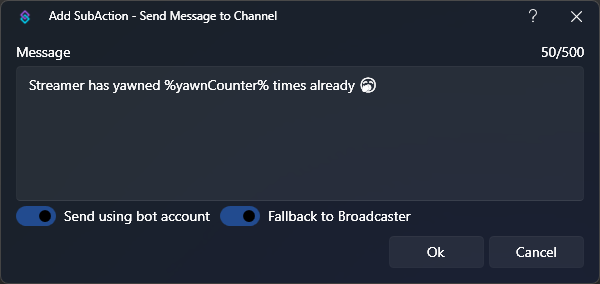 Counter Message
You can also create a second action and chooseDecrementon the Global (Set) subaction instead to lower the counter with each trigger. - Done!
Tips & Tricks
Quickly Access Persisted Global Variables
Did you know you can access Persisted Global (Non-User) Variables immediately, without using a Global (Get) sub-action?
To do this, we can wrap the name of the global variable with tilde
For example, instead of
This only works for this specific kind of global variables.
Any non-persisted and/or user variables still require a preceding Global (Get) sub-action.
Did you know you can access Persisted Global (Non-User) Variables immediately, without using a Global (Get) sub-action?
To do this, we can wrap the name of the global variable with tilde
~ symbols instead of percent % symbols.
For example, instead of
%yawnCounter%, we simply write ~yawnCounter~This only works for this specific kind of global variables.
Any non-persisted and/or user variables still require a preceding Global (Get) sub-action.
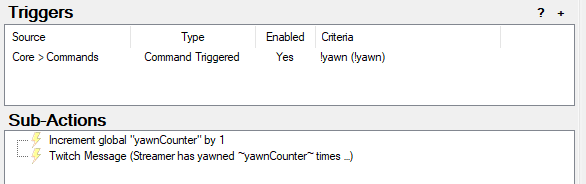
Counter Variant 2
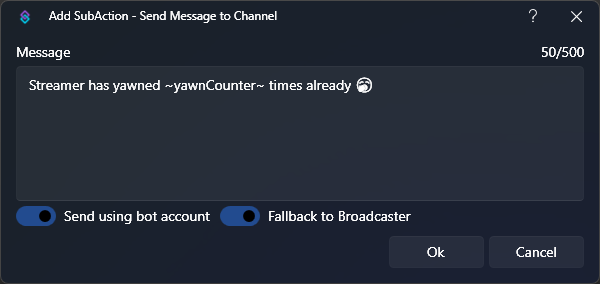
Counter Variant 2 Message